Never leave an agent waiting.
Roost puts every Claude Code session on the edge of your screen as an app icon. A red dot means it needs you. One click brings its Terminal window to the front.
14 days with everything, then free for up to 3 sessions. macOS 13 or later, Apple Silicon, Claude Code in Terminal.app.
- Needs you
- Working
- wipWaits on background work
- Quiet
At five sessions, the bottleneck is you.
You run a release, a customer thread, a flaky test and an ops check, each in its own Claude Code session. Claude is no longer the slow part. Finding the session that needs you is.
A waiting agent does nothing
A session that asks a question stops until you answer. With ten windows open, you don't see which one asks. One "yes" can wait an hour.
The right window is hard to find
The windows look the same, the titles are cut off, and half of them are on the other screen. Cmd+` is a guessing game.
Everything has the same weight
A customer thread and a test run are both one window. The window list has no priority.
You forget what a session was for
After a day, "claude" in a tab title tells you nothing.
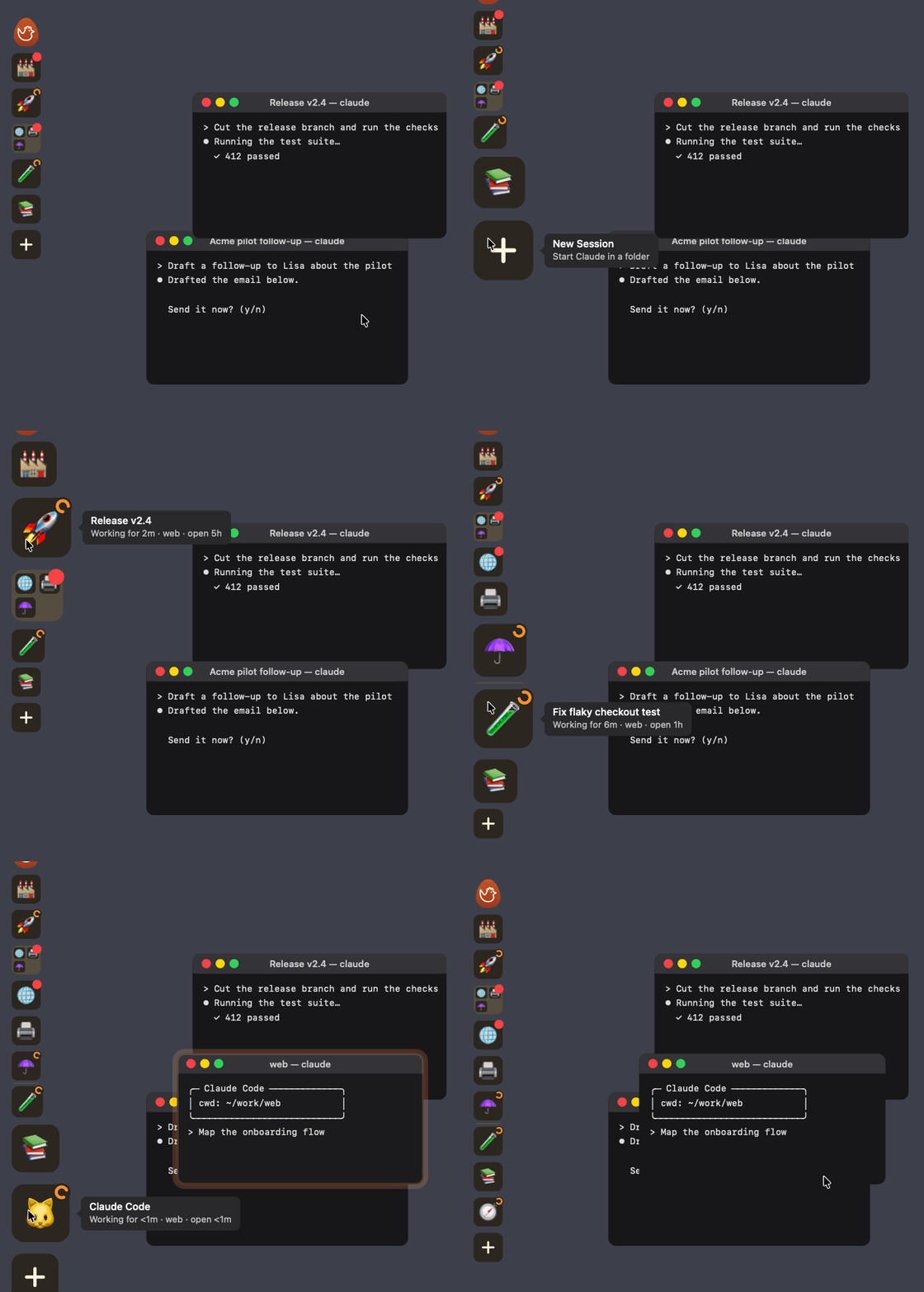
One glance, one click.
- Look at the edge of the screen. A red dot means a session waits for you. An orange spinner means it is working. No mark means it is quiet.
- Hover a tile. It grows like the Dock, and a label shows the title, status, folder and the session's notes.
- Click it. Its Terminal window comes forward and flashes an orange border, also on your other screen.
- Go back to what you were doing. The strip stays on top and out of the way.
What's in the strip
Roost is small on purpose. It has no main window. Everything lives in the tiles, their right-click menus and the + tile.
Faces, not titles
Each session sets its own picture, color and notes through a local API. A customer thread can show the person's face, a vendor its logo. The tile and the Terminal tab share the color.
Your order
Drag tiles like the Dock to set priority. Group them into topics, such as "Support" or "Customers". A topic shows the most urgent mark of its sessions.
This week
Roost reads deadlines like (due Fri 18:00) from session notes. A folder on top holds every session with something due before Monday, soonest first.
Snooze
Take a session off the strip for an hour, until tomorrow or until the weekend. Or snooze it every work day from 9 to 18. It comes back by itself.
Wide Mode
A grid of three tiles per row, with each topic on its own row, so every topic can stay open. The tiles grow to fill the height of the screen.
Restart All
Quit Terminal and reopen every session with claude --resume, each in its own window. Sessions keep their place, title, picture and notes. Roost asks first and waits for working sessions if you want.
How it works
- Roost reads what Claude Code already writes. Claude Code keeps a file for every session on your Mac. Roost watches those files, so it sees the sessions you already run.
- You keep your terminal and your habits. No wrapper, no tmux, no new way to start a session. Start Claude Code the way you always do. The + tile is there if you want it.
- Sessions talk to Roost on your Mac. A small local API on
127.0.0.1lets a session set its picture, color, notes and topic.
Local only
- No account and no cloud. Roost runs on your Mac and nowhere else.
- The app sends nothing anywhere. No telemetry, no crash reports, no update pings.
- The license is checked offline. Roost works on a plane.
- This website has no analytics and no cookies.
- Nothing to migrate. Quit Roost and your sessions keep running as before.
One price, once
Try everything for 14 days. Keep using it free with up to 3 sessions, or buy a license for as many as you run.
Free
- 14-day trial with everything
- After that, up to 3 sessions on the strip
- No account, no email address needed
Personal license
- Unlimited sessions on the strip
- One person, all of their Macs
- Every 1.x update included
- 14-day refund, no questions asked
The source code is open, under the MIT license, on GitHub. You pay for the ready-made app and the updates, and that funds the work on Roost. If you'd rather compile it yourself, you can.
Questions
What happens after the 14 days?
Roost keeps working, free, with up to 3 sessions on the strip. A license unlocks unlimited sessions again. You don't need to sign up for the trial, and nothing asks for a card.
Does it work with iTerm2, Ghostty or VS Code?
Not yet. Roost works with Claude Code running in Terminal.app, the terminal that comes with macOS. It needs that to bring the right window forward and to color its tab. iTerm2 and Ghostty are the next candidates if enough people ask; say so in a GitHub issue.
What do I need to run it?
A Mac with Apple Silicon and macOS 13 or later, and Claude Code running in Terminal.app. Roost does not support Intel Macs.
Won't Anthropic build this into Claude Code?
They might, and if they do, it may well cover what you need. Roost is built so you lose little when that day comes: it reads the files Claude Code already writes, adds no wrapper, and asks you to change nothing about how you work. Remove it and your sessions are as they were.
Until then, Roost depends on Claude Code files that are not documented. A Claude Code update can break the session list until Roost ships a fix. The free trial is there so you can judge if it's worth $49 to you today.
Can I get a refund?
Yes. Within 14 days of buying, reply to your receipt email and you get your money back. No questions asked.
It's open source. Why pay?
The code is MIT licensed on GitHub, and you're welcome to build it yourself. The $49 buys the ready-made app and every 1.x update, and it pays for the time that goes into Roost.
How do I install it? macOS says it can't open Roost.
Open the DMG and drag Roost to Applications. Roost is not notarized by Apple yet, so macOS blocks it the first time you open it. Go to System Settings → Privacy & Security, scroll down, click "Open Anyway" next to the message about Roost, and confirm. You only do this once.
Where do I report a bug or ask a question?
Bugs go to GitHub issues. For questions about your license or a refund, reply to your receipt email.

See which session needs you.
Free for 14 days with everything. No account.